What it is
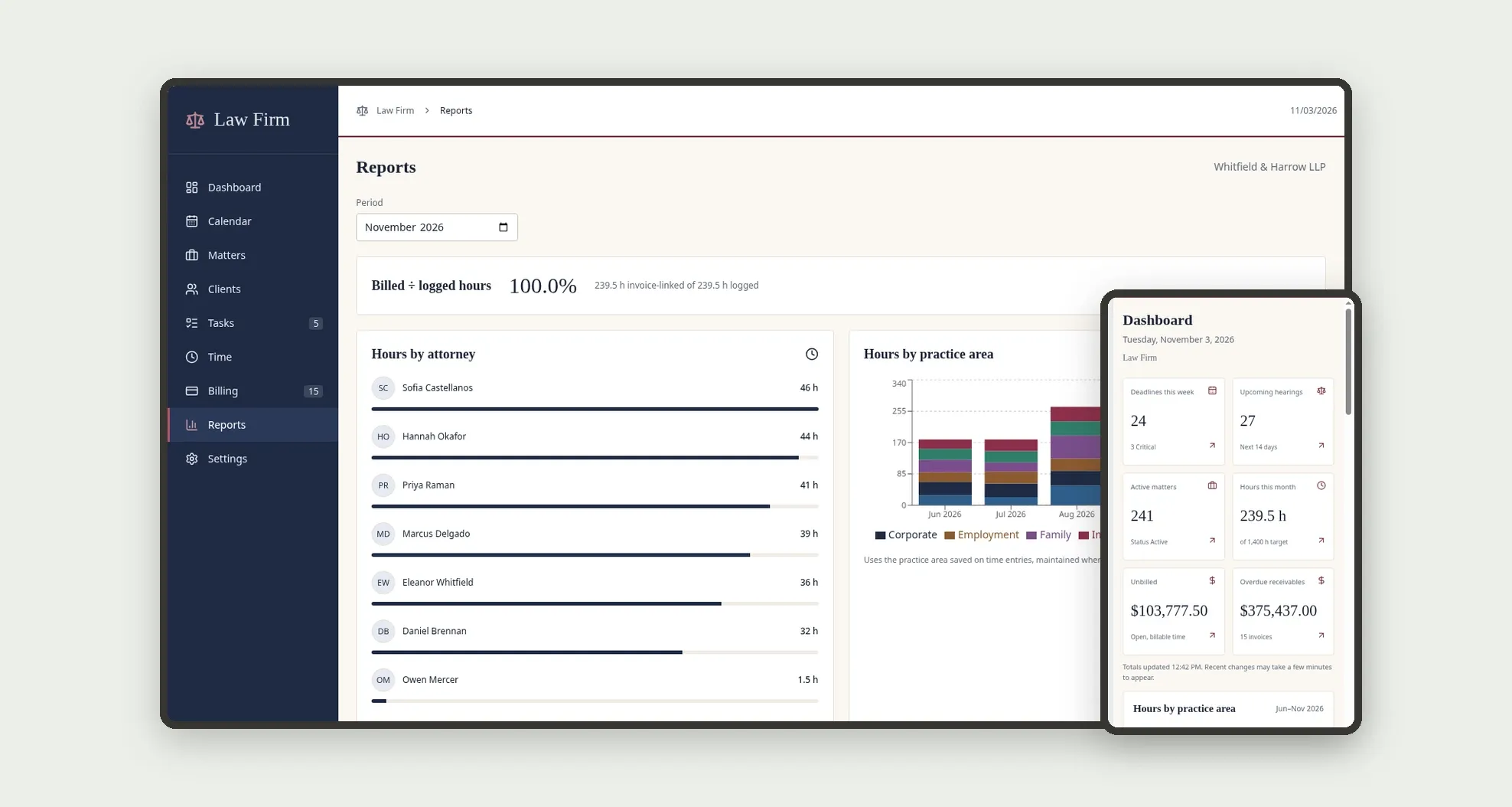
A template for small and mid-size law firms to manage matters, court deadlines, hearings, billable hours and invoices in one place. The Calendar shows the week's deadlines and hearings by attorney and practice area, and the Dashboard tracks deadlines this week, upcoming hearings, hours this month, unbilled time and overdue receivables. It comes with sample data from Whitfield & Harrow LLP, a fictional firm.
Who it's for
- Law firms practicing litigation, corporate, employment, family, real estate and immigration law
- Partners who follow the caseload, the team's hours and overdue receivables
- Associates and paralegals who keep track of deadlines, hearings, case activity and tasks
- Billing teams that turn logged hours into invoices and record payments
- Firms that bill by the hour, on a flat monthly retainer, on contingency or flat plus contingency
What you can do
- See deadlines and hearings on the Calendar in Week or List view, filtered by responsible person, type, practice area and priority, with Critical deadlines highlighted
- Complete, reschedule, cancel or mark a deadline as missed, with past-due pending deadlines flagged as Overdue
- Follow matters in a list or on a Kanban board by stage, and drag a card to move the matter to the next stage
- Open a matter to see its case activity timeline, deadlines, tasks, documents, time, billing and log
- Log time by timekeeper, matter and client, with the amount calculated from the fee agreement or team member hourly rate
- Generate a client invoice for a billing period from open billable time plus the agreement's flat amount, issue it, record payment by ACH, check, wire or card, and print or save it as PDF
- Manage fee agreements and tasks with due dates, priority and status
- Block double-booking: a hearing, client meeting or deposition can't be saved if the same person already has an overlapping event, and the app shows which event conflicts
- Analyze hours by attorney and practice area, billed vs. logged hours, collections by month, matters by stage and practice area, and deadlines completed vs. missed in Reports
App features
Dashboard
The Dashboard screen covers this part of the operation.
Calendar
Complete deadlines from the Calendar; the matter's next deadline updates automatically.
Matters
Follow matters in a list or on a Kanban board by stage, and drag a card to move the matter to the next stage.
Clients
The Clients screen covers this part of the operation.
Tasks
Manage fee agreements and tasks with due dates, priority and status.
Time
Log time by timekeeper, matter and client, with the amount calculated from the fee agreement or team member hourly rate.
Billing
In Billing, generate the invoice for the billing period, issue it and record the payment when the client pays.
Reports
Analyze hours by attorney and practice area, billed vs. logged hours, collections by month, matters by stage and practice area, and deadlines completed vs. missed in Reports.
Settings
In Settings, add the firm, the team with role and hourly rate, the practice areas and the courts.
How it works
In Settings, add the firm, the team with role and hourly rate, the practice areas and the courts. Add the client, the fee agreement and the matter with practice area, court, responsible attorney, stage and risk.
From the matter, log case activity, deadlines, hearings, tasks and time, already linked to the matter and the client. Complete deadlines from the Calendar; the matter's next deadline updates automatically.
In Billing, generate the invoice for the billing period, issue it and record the payment when the client pays. Every stage change creates a case activity entry and is saved in the Activity log.
How to set up this template
- 1Click Use App
Create your Jestor account and install Law Firm & Case Management. It works on desktop and mobile.
- 2In Settings
In Settings, add the firm, the team with role and hourly rate, the practice areas and the courts.
- 3Add the client
Add the client, the fee agreement and the matter with practice area, court, responsible attorney, stage and risk.
- 4From the matter
From the matter, log case activity, deadlines, hearings, tasks and time, already linked to the matter and the client.
Integrations and customization
The template works on desktop and mobile and can be adapted without code.
- Works on desktop and mobile; on mobile there is a bottom bar with Dashboard, Calendar, Matters, Tasks and More, and tables become cards
- Follows the Jestor light or dark mode automatically
- Amounts in US dollars and dates in MM/DD/YYYY format
- Administrator, Partner, Associate, Paralegal and Billing roles define what each person sees; users who are not on the team get Administrator access
- Practice areas, courts, stages, deadline types, fee models and fields can be adapted in Jestor without code
- The template does not connect to court systems or receive court notices automatically: the team records case activity and deadlines
And that's just the start: you can edit any part of this template and go much further just by asking Jestor's AI. Describe what you need, like a new field, automation, report or integration, and the AI builds or adjusts it for you, no code required.
Frequently asked questions
How does the app help prevent missed deadlines?
The Calendar and the Dashboard show the week's deadlines with days left, Critical deadlines are highlighted, and a pending deadline with a past date shows as Overdue until it is completed or marked as missed.
How do logged hours become an invoice?
In Generate invoice, you pick the client and the billing period; the app adds up that period's open billable time entries and the agreement's flat amount, creates the invoice as Draft and marks the entries as Billed.
How are overdue receivables calculated?
They are the total of issued invoices past their due date, shown as an amount and as a number of invoices.
How is the hourly rate set for a time entry?
The entry uses the hourly rate from the client's fee agreement when the model is Hourly, and otherwise the team member's hourly rate.
Does the app prevent double-booking?
Yes. A hearing, client meeting or deposition can't overlap another event for the same responsible person; saving is blocked and the app shows a message with the conflicting event and its time.
Is the sample data real?
No. The firm, team, clients, matters and case numbers are fictitious: about 300 matters, 120 clients, 960 case activities, 420 deadlines and hearings, 200 tasks, 700 time entries and 170 invoices.