What it is
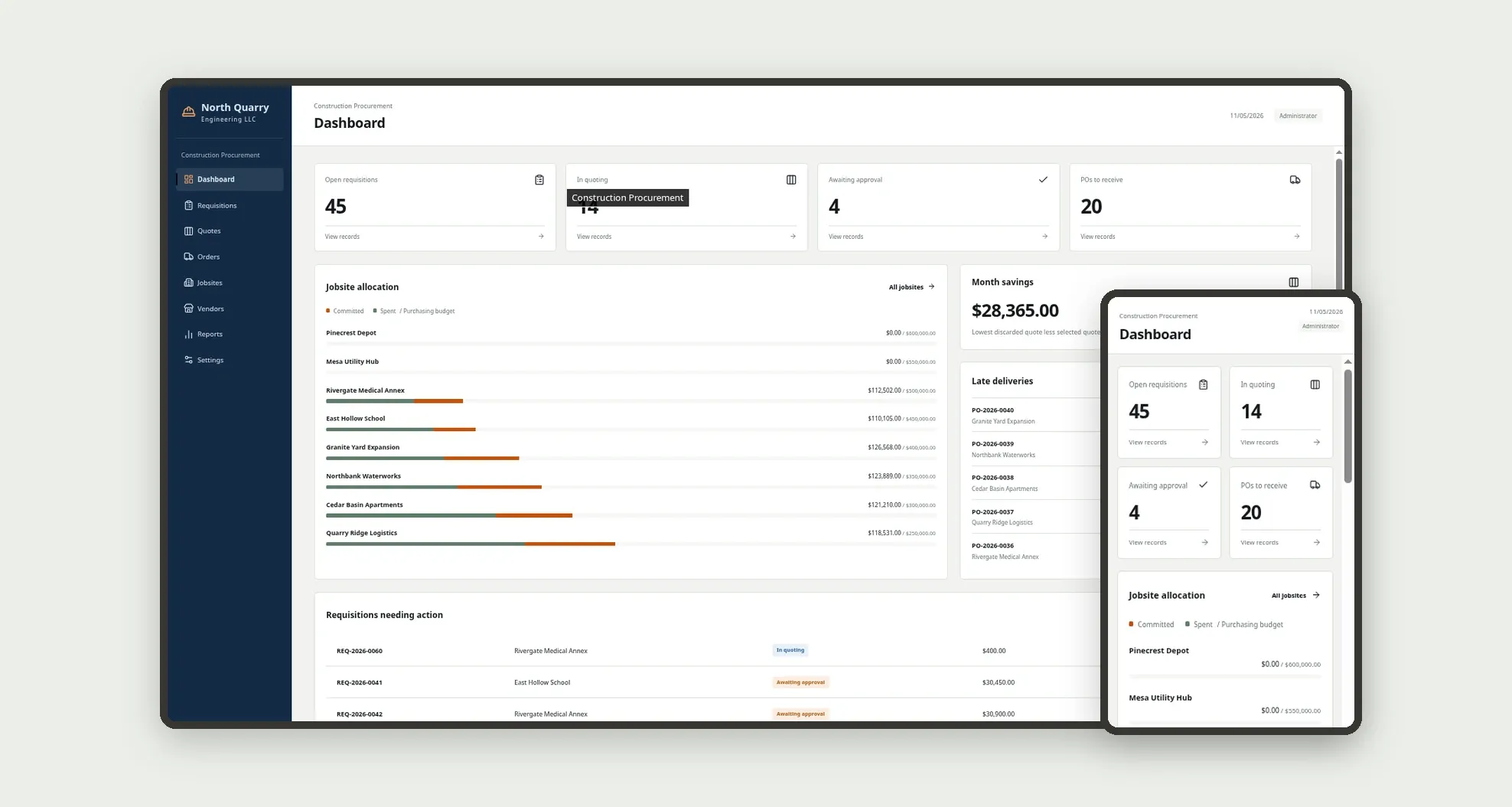
A purchasing system for contractors to organize requisitions by jobsite, compare quotes side by side, issue POs, and record receipts with cost allocated by jobsite and phase. The team sees what is in quoting, what needs approval, and committed versus budget, on desktop and mobile.
Who it's for
- Small and mid-size contractors and developers
- Site engineers who open requisitions
- Buyers who quote and order materials and services
- Finance who approve purchases above the threshold
- Warehouse staff who confirm receipt on site
What you can do
- Open requisitions tied to a jobsite, with lines and cost phase
- Record and compare quotes side by side (amount, lead time, freight)
- Require three quotes above the configured threshold
- Approve purchases and create POs from the selected quote
- Record partial or full receipt and update jobsite spend
- Track budget, committed, and spent by jobsite
- See on the dashboard what is in quoting, awaiting approval, or to receive
- Review spend by jobsite and phase and savings from quotes
App features
Construction Procurement
The Construction Procurement screen covers this part of the operation.
How it works
The jobsite opens a requisition with line items. The buyer gathers quotes, compares, and selects.
If the amount requires it, finance approves.
The PO is issued and on-site receipt updates quantities and jobsite cost.
How to set up this template
- 1Click Use App
Create your Jestor account and install Construction Procurement. It works on desktop and mobile.
- 2The jobsite opens a requisition with line items.
The jobsite opens a requisition with line items.
- 3The buyer gathers quotes
The buyer gathers quotes, compares, and selects.
- 4If the amount requires it
If the amount requires it, finance approves.
Integrations and customization
Works on desktop and mobile. You can adjust quote and approval thresholds, jobsites, and roles without code. It does not replace a generic corporate purchase-request template: the focus here is jobsite and allocation.
- Adjust fields, categories, statuses and rules without code.
- Add screens, reports and automations as the operation needs them.
And that's just the start: you can edit any part of this template and go much further just by asking Jestor's AI. Describe what you need, like a new field, automation, report or integration, and the AI builds or adjusts it for you, no code required.
Frequently asked questions
How is this different from generic Purchase Requests?
Here every requisition starts on a jobsite, quotes are compared side by side, and cost is allocated by jobsite and phase.
When do I need three quotes?
When the estimated total exceeds the threshold in Settings. The app blocks progress until three received quotes exist.
Who approves the purchase?
Above the finance threshold, the Finance or Administrator role. Below it, the flow continues after the quote is selected.
Is partial receipt possible?
Yes. The PO and requisition status become Partially received until quantities are complete.
Does it work on mobile?
Yes. There is a bottom bar with the main shortcuts.